New websites often spend their first month installing SEO plugins, changing title templates and wondering why Google hasn’t sent visitors yet. Some of those settings are necessary. But they are only the beginning.
Search works better when your pages are easy to discover and worth reading. A site with careful titles and a collection of thin, repetitive articles is still not very useful. This checklist separates the technical basics from the editorial work that matters over time.
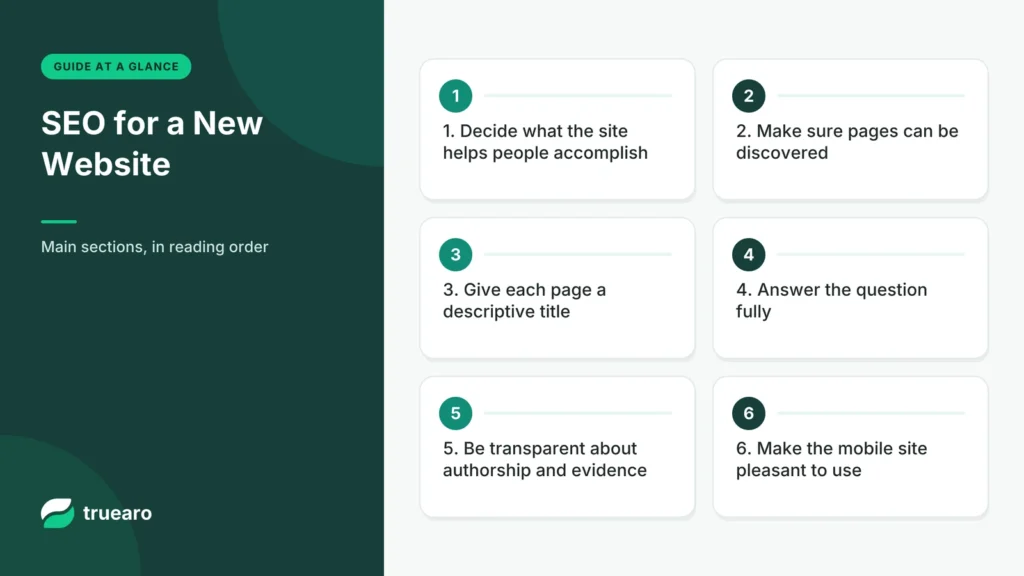
1. Decide what the site helps people accomplish
Before researching keywords, define the reader. A publication about software for small teams can cover website builders, business software and productivity without publishing an unrelated article every time a topic becomes popular.
Create a small set of clear categories. If the site helps people choose technology, organize around that task: comparisons, reviews, guides and practical tools. A narrow, understandable purpose helps visitors know where to go next.
2. Make sure pages can be discovered
Check that your important pages aren’t accidentally blocked by a robots rule or a noindex setting. Use Google Search Console to inspect URLs when necessary. A sitemap is a discovery aid, not a command that forces indexing. WordPress provides sitemap functionality, and SEO tools may offer additional controls.
Link to articles from category pages and other relevant articles. If a useful piece has no internal links, readers and crawlers may struggle to find it even if it appears in a sitemap.
3. Give each page a descriptive title
A title such as Shopify vs. WooCommerce: Cost, Maintenance and Control tells readers what they’ll learn. A title such as You Won’t Believe the Winner of This Platform Battle does not. Write titles for readers first and avoid exaggeration that the article cannot support.
Use one main headline, clear section headings and a helpful introductory paragraph. Don’t repeat the same phrase mechanically in every heading.
4. Answer the question fully
If somebody searches how to choose a website builder, they probably want to know how to compare cost, ease of use, ownership and requirements. A generic list of tool names will not solve the decision.
Include an example or decision worksheet that adds something practical. Explain when your recommendation would change. Link to primary sources for prices, legal requirements and product capabilities that may be updated.
5. Be transparent about authorship and evidence
Readers should be able to see who runs the publication and how reviews are prepared. If you have only evaluated official documentation, call it a desk review. Do not invent personal testing sessions, expert credentials or review totals.
Google’s people-first content guidance encourages creators to consider who produced content, how it was made and why it exists. That is a sound editorial discipline even outside search marketing.
6. Make the mobile site pleasant to use
People shouldn’t need to pinch and zoom to read an article. Navigation should work without guessing what an icon means. A reader shouldn’t encounter a large, sticky advert covering the content or a signup popup that is difficult to close.
Use sensible tap targets and preserve adequate contrast. A clean reading experience also makes it easier for readers to follow internal links and explore other content.
7. Improve performance before adding decorations
Start with appropriately sized images, minimal unnecessary JavaScript and sensible caching. Keep a consistent font system. Performance measurements can identify what users actually experience rather than relying on the number of plugins installed.
8. Handle links and updates with care
When you rename an article, check whether the URL changed. If it did, consider a redirect from the old URL so existing links continue to work. Repair broken internal links. Make substantive updates when features or prices change rather than changing dates automatically.
9. Measure progress over months, not days
Search Console shows which pages are indexed and which queries lead people to the website. Look for patterns: an article may attract impressions but few clicks because its title is unclear, or readers may arrive but fail to find the next useful page.
Use those observations to improve titles, introductions and navigation. Search results vary with competition, crawl timing and other factors, so there is no reliable guarantee that a new publication will rank for a popular term in a fixed number of weeks.
10. Put useful internal links where they belong
A strong cluster can connect a broad guide to more specific decisions. For example, a website-building article can point to a detailed platform comparison and a realistic cost breakdown. Those links help readers continue their research naturally.
For a practical example, begin with our website launch checklist, then explore choosing a builder and website budgeting.
Search visibility begins with publishing a useful answer
A new site should identify the reader’s problem before choosing keywords. A guide on subscription costs should explain what is charged, what the reader should calculate and which evidence is available. A page built only around repeated search terms offers little value, even if its title matches a popular query.
Build a small topical map rather than publishing dozens of overlapping articles. For a software decision site, one core guide might explain how to evaluate a category, while related pages compare specific products and costs. Link between pages where a reader needs the next step. Keep URL structures predictable and avoid creating nearly identical articles for every minor phrase variation.
Technical checks for the first ten articles
| Check | Useful result |
|---|---|
| Canonical URL | Correct primary address for the article |
| Indexing | No accidental noindex or crawl block |
| Title and description | Specific summary matching reader intent |
| Internal links | Related pages reachable through helpful context |
| Structured data | Truthful markup aligned with visible information |
| Mobile experience | Text, navigation and tables remain usable |
Register the website in Google Search Console and monitor indexing and query data over time. A submitted sitemap helps discovery, but it does not force every page into the index. If an article is not indexed, inspect technical signals and assess whether it adds enough original value.
Build a correction and update practice
Product comparisons become stale when prices or plan features change. Record source links and the date of verification. Review important buying guides periodically, fix inaccuracies and make meaningful updates rather than merely changing the publication date. Honest authorship, editorial policies and clear disclosures support reader confidence.
SEO should make good content discoverable and understandable. It cannot replace the research, calculations and careful examples that make a visitor trust a recommendation.
Build topical authority by answering related decisions
A new publication should not chase every trending search. Choose a defined audience and a small set of important decisions it regularly faces. For example, a business software publication might explain how to choose a CRM, how to calculate subscription ownership cost, and how specific products differ on practical workflows. Those pages should connect naturally because they help the same visitor make a more informed choice.
Before creating another comparison, inspect existing content. If a new article would repeat the same answer with slightly different keyword wording, improve the stronger page instead. If the new question involves distinct decision criteria, create a separate article and link to the relevant background. This prevents a library from filling with overlapping pages that compete for attention without helping readers.
Validate search intent with the actual problem
A reader searching “best payroll software” may expect product recommendations, but the useful answer still needs context: country, employee count, contract type and payroll complexity. A reader searching “how to set up DKIM” needs accurate steps and warnings about DNS configuration. The page format should match the job. Do not force a shopping-style comparison into a technical tutorial or inflate a straightforward answer with unrelated sections.
Write a one-sentence promise for each article before drafting: what will the visitor be able to decide or do after reading? Use the promise to test every section. If a paragraph neither answers a question nor supports the recommendation, it probably does not belong. Word count should follow subject complexity, not the other way around.
Use evidence that readers can verify
For product comparisons, link to current vendor documentation, pricing and important usage limits. Use the correct region and plan when discussing fees. If a feature cannot be verified, describe it as a question to check rather than stating it as fact. Do not attribute hands-on experience or independent benchmarks to the publication unless those tests actually took place.
For technical guides, link to primary standards or platform documentation when available. For a numerical illustration, show assumptions and calculation steps. For a recommendation, explain which type of reader benefits and who may be better served by another approach. Helpful content can acknowledge uncertainty without becoming indecisive.
Structured data must accurately describe the visible page
Search engines can use structured data to understand page entities and relationships, but a schema type is not a guarantee of enhanced search appearance. A normal editorial article can use Article markup with truthful author, publisher, dates and image information where appropriate. BreadcrumbList should reflect real navigation. Review and product ratings should not be invented simply to trigger attractive snippets.
Use one coherent structured-data implementation rather than pasting duplicate JSON-LD blocks into individual articles. Validate generated output after theme or SEO plugin changes. Structured data should support the page’s real content, not make a thin article seem more authoritative than it is.
Separate ranking changes from measurement changes
Search Console can show impressions, clicks, queries, indexing states and other signals, but the data needs interpretation. A decline in clicks can coincide with stable impressions if search results change or the displayed title attracts fewer users. A reporting error or site migration can also change observed metrics. Compare affected pages and time periods before attributing every movement to content quality.
Choose a small monthly review process. Inspect indexing issues on important pages, pages with useful impressions but poor engagement, factual information that may have changed and articles with missing internal connections. Fix the most consequential problems first. Do not rewrite a successful evergreen guide merely because a generic SEO tool suggests a higher keyword density.
Keep the mobile reading experience central
Long comparison tables can become unusable on a narrow screen. Provide clear column headings, sensible wrapping or scrolling behavior, and a concise explanation of what the table means. Avoid large intrusive popups, sudden advertisements and decorative animations that push the answer below the fold. A search visitor should not have to fight the interface to find a useful conclusion.
Use descriptive link text, readable line lengths, accessible contrast and proper heading hierarchy. The goal is for readers to return because Truearo consistently helps them make better decisions, not because every article contains the same rigid SEO template.
Plan updates around factual risk
A timeless explanation of what a domain registrar does may not need frequent rewriting. A comparison involving product prices, feature entitlements or regulations may require more frequent verification. Assign a review cadence based on how quickly the underlying facts can change. Record checked sources and revise passages that are no longer supported.
When an error is found, correct it transparently and preserve a consistent URL whenever reasonable. Changing the modified date without improving content does not give readers new value. A trustworthy editorial archive is maintained through evidence and corrections, not cosmetic freshness.
A final pre-publication check
Before pressing Publish, ask whether the article directly answers the promised question, whether each material claim has adequate evidence, and whether important limitations are visible. Check titles, canonical URLs, accessible headings, meaningful internal links and any structured data generated by the site. If the article cites a product price, verify the current country, tier and date. If it describes a test, make clear whether that test actually happened.
Review a finished page as a first-time visitor on a phone. The reader should be able to understand the answer, inspect sources and take the next useful step without navigating through repetitive keyword phrases or promotional distractions.
The simplest launch plan
Publish a modest collection of useful pieces that you are prepared to maintain. Check indexing and navigation. Make it easy to contact the publisher. Continue improving what readers need. There is no magic SEO score, keyword density or plugin combination that replaces a credible website.
Sources: Google Search Essentials; Google people-first content guidance; Core Web Vitals. Reviewed November 2026.